Effortless Expense Tracking with AI-Powered Receipt Scanning
Snap a photo, and MobileLedger intelligently organizes your business expenses. Simplify bookkeeping, save time, and stay on top of your finances. 💰🗂️
See MobileLedger in Action
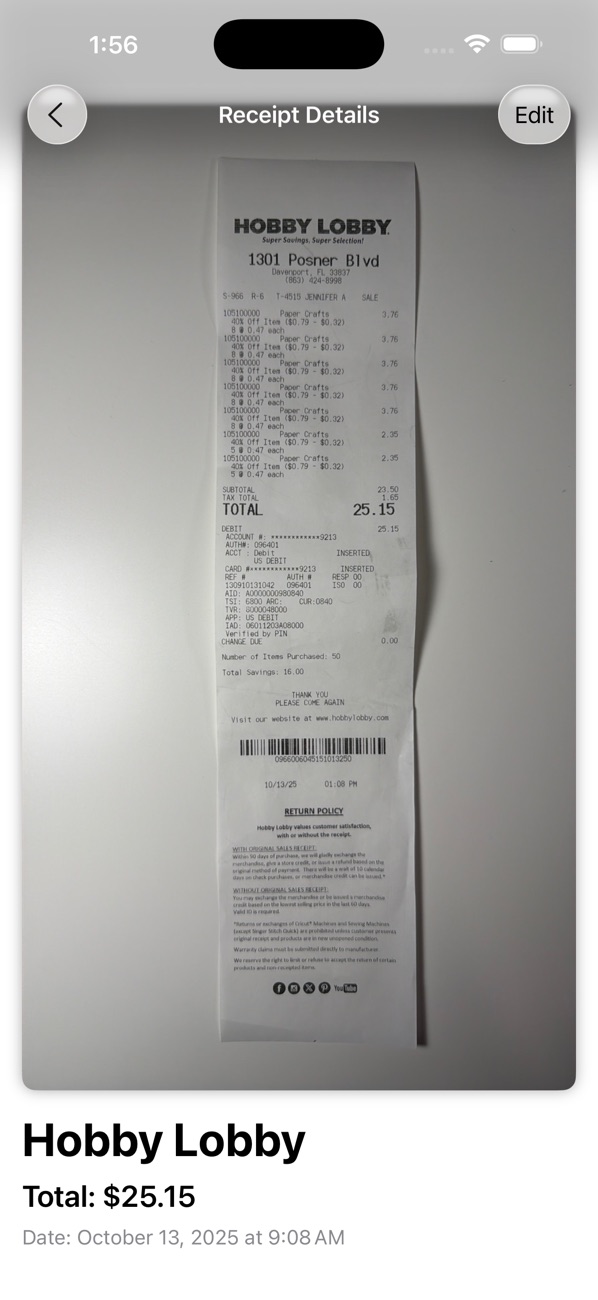
Explore how MobileLedger's intuitive interface simplifies your expense tracking.
iPhone & iPad


Why Choose MobileLedger for Your Business?
MobileLedger empowers small business owners and freelancers to take control of their expenses with cutting-edge technology and a focus on privacy.
AI-Powered Scanning
Utilize Apple Intelligence to automatically extract details like store name, total, and date from your receipts with just a single photo.
Automatic Organization
Receipts are intelligently grouped by store, creating a clean, organized library of your business expenses for easy review.
Private & Secure Data
All scanning and data processing occurs directly on your device. Your financial information never leaves your personal iCloud account.
Seamless iCloud Sync
Your expense data is always safe, private, and automatically synced across all your Apple devices: iPhone, iPad, and Mac.
Full Editing Control
While our AI is smart, you maintain complete control. Easily edit receipt totals, dates, or rename stores to ensure perfect accuracy.
Powerful Features Designed for Productivity
MobileLedger combines intelligent automation with intuitive design to make expense management simpler than ever before.
Intelligent Automation
Leverage advanced AI to minimize manual data entry and streamline your receipt processing workflow.
AI-Powered Scan
Instantly capture and parse receipt details using on-device Apple Intelligence.
Automatic Grouping
Receipts are automatically categorized by store, creating an organized expense history.
Flexible Editing
Easily adjust any extracted data, including totals, dates, and store names, for complete accuracy.
Secure & Accessible
Your financial data is always protected, private, and available exactly when and where you need it across your devices.
On-Device Privacy
All sensitive financial data is processed locally and never leaves your device or personal iCloud.
iCloud Sync
Keep your expenses up-to-date and accessible across your iPhone, iPad, and Mac with secure iCloud synchronization.
Visual Grid Layout
Quickly browse and locate receipts with an intuitive visual grid displaying store and receipt previews.
Universal iOS Support
Enjoy a consistent and optimized experience on both your iPhone and iPad devices.
What Our Users Say About MobileLedger
Hear from small business owners and freelancers who have streamlined their expenses.
As a busy freelancer, MobileLedger has been a game-changer. Snapping a photo of receipts saves me so much time, and the automatic organization is fantastic. Highly recommend!
Finally, a receipt scanner that truly understands privacy. Knowing my data stays on my device is huge. The AI is surprisingly accurate, and editing is a breeze when needed.
I used to dread expense reporting, but MobileLedger makes it almost enjoyable. It's fast, efficient, and keeps everything neatly in one place. Plus, it's free!
The iCloud sync is flawless. I can capture a receipt on my iPhone and review it on my iPad later. This level of convenience for a free app is incredible.
Download MobileLedger Today – It's Free!
Stop wrestling with paper receipts and spreadsheets. Download MobileLedger now and revolutionize your business expense tracking.
Frequently Asked Questions
Find quick answers to common questions about MobileLedger's features, privacy, and compatibility.
Yes, MobileLedger is completely free to download and use. There are no hidden costs or subscriptions for its core features.
MobileLedger utilizes on-device Apple Intelligence to analyze photos of your receipts. It intelligently extracts key information like the store name, transaction total, and date, eliminating manual entry.
Absolutely. All receipt scanning and data processing happens entirely on your device. Your financial information never leaves your personal device and is only synced via your private iCloud account.
MobileLedger is a universal app, fully supported on iPhone, iPad, and Mac (via iCloud sync). Enjoy a consistent experience across all your Apple devices running iOS 26.0 or later.
Yes, you have full control. After a receipt is scanned, you can easily edit any of the extracted details, including the total, date, and even rename the store.
While our AI is highly accurate, you always have the option to manually correct any parsed information. Simply tap on a receipt to enter the editing mode and make adjustments.